Scope and evidence
- Source review
- Cloud scope
- AWS / Azure / GCP
- Availability
- Varies by feature
- Exercise status
- Exercises not run
Conditions and limits
- AWS documentation was read; Azure/GCP are conceptual source scope, not verified workspace or regional availability.
- Runtime, compute, storage path and Unity Catalog permissions affect settings; preview type widening is excluded from the example.
- Examples and exercises are unexecuted; no Databricks performance, cost or recovery measurement is claimed.
The file arrived once; the order still appeared twice
Imagine an order exporter that uploads part-001.json, retries tomorrow as retry-001.json, and includes the same order event in both. A dashboard sums the two rows. The ingestion job has succeeded, yet revenue is wrong. This is an original hypothetical example, not an observed Databricks incident.
Auto Loader supplies the Structured Streaming source cloudFiles: it incrementally discovers and reads object files, with progress stored in a checkpoint. That solves the question of which files an ingestion stream has processed. The identity of an order event, the meaning of a corrected order and the aggregation used by a dashboard need additional decisions.
The useful mental model is a chain of contracts: object → discovered file → parsed row → validated event → business metric. Each arrow can succeed while the following arrow remains wrong. A parser accepting "amount": "19.95" does not establish its currency, whether it includes tax, or whether a later file reverses the transaction.
Scroll horizontally to read the diagram.
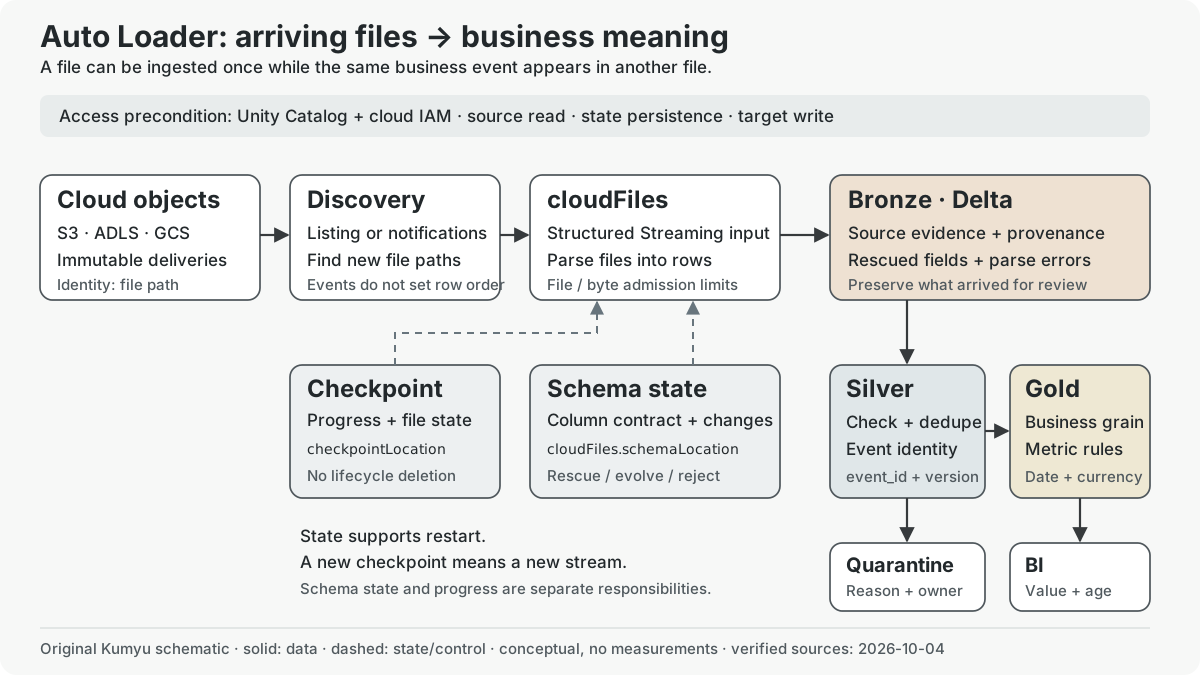
Original explanatory schematic by Kumyu. Solid arrows show data movement; dashed arrows show control or state relationships. The boxes express responsibilities, not separate servers or measured latency. The diagram does not reproduce a vendor image.
What has been verified, and where it applies
The sources below were opened on 2026-10-04. They are AWS editions of Databricks documentation. The supported-source list includes S3, ADLS, GCS and Unity Catalog volumes. The AWS mode comparison lists S3, ADLS and GCS file events for Runtime 14.3 LTS and above. Those are documented conditions, not confirmation that a particular AWS, Azure or GCP workspace, region or compute configuration is enabled.
| Boundary | Meaning for this lesson |
|---|---|
| Cloud scope | AWS documentation checked; Azure and GCP are conceptual source scope. Their current regional and workspace availability was not independently checked. |
| Runtime and compute | Record the actual Runtime, compute type, path and access mode before applying a setting. The example assumes a suitable Unity Catalog environment; it is not a tested compatibility matrix. |
| Preview state | The schema page labels addNewColumnsWithTypeWidening Public Preview on Runtime 16.4+. The example uses rescue instead. No preview feature is silently required. |
| Execution | The design, code and recovery exercises have not been run on Databricks. No throughput, bill, recovery time or accuracy has been measured. |
Documentation revision dates are not feature release dates. The schema and mode pages display 2026-09-11; production guidance displays 2026-09-18; the options reference displays 2026-09-23. Original publication dates are unknown. These revisions fall within the explicit 2026-09-04–2026-10-04 (Asia/Tokyo) review window, but do not prove that every described feature launched in that month. Historical context is narrower: the Runtime 14.3 LTS notes state a February 2024 release and describe native XML support as Public Preview at that time. Historical preview status is not a current availability claim. No entry dated after October 4 is treated as already released.
Five names that should remain separate
The landing path contains files created by a producer. Prefer immutable objects with a unique name per delivery. The discovery mode determines how new paths are found. cloudFiles reads those files into rows. cloudFiles.schemaLocation retains the inferred column contract and its changes. checkpointLocation retains the streaming query's progress and state.
The schema guide allows schema and checkpoint state to use the same directory, and Lakeflow pipelines can manage them. In the teaching example, distinct subdirectories make their responsibilities visible; this is an organizational choice. Neither is a substitute for the destination Delta table. Give each ingestion workload its own checkpoint rather than sharing a progress ledger between independent inputs.
For the fictional order service, a path containing date=2026-10-04 says where the producer placed a file. It does not prove that every order in that file occurred on October 4. A late correction can arrive today for last month's order. File arrival, event time and dashboard refresh time need separate fields and policies.
Exactly once has a boundary
The FAQ describes normal file identity in terms of path, recommends immutable files and warns about overwrites. With cloudFiles.allowOverwrites=true, an entire updated file can be processed again; handling repeated business records becomes the pipeline's responsibility. A new checkpoint effectively starts a new stream. Changing a directory name is therefore a recovery decision, not cosmetic cleanup.
The production guide warns that a lifecycle policy deleting checkpoint files corrupts stream state. Aggressively shortening cloudFiles.maxFileAge can cause missed or repeated ingestion. Keep the file-state retention decision separate from source-file retention and Delta-table retention. They protect different evidence.
For part-001.json and retry-001.json, write a Silver rule around a producer-issued event_id. If a producer can revise a previous event, also define an event version or correction policy. Deduplicating only by order_id would erase legitimate later order events. Conversely, deduplicating by filename would leave the two repeated events untouched. This is a data-model choice; Auto Loader cannot infer it from a path.
Do not extend file-processing guarantees to arbitrary side effects. If a custom batch handler sends email or writes to a separate operational service, design and test that operation's idempotency independently. A successfully committed Delta ingestion does not prove that an external email was sent exactly once.
Settings change work boundaries, not business meaning
The options reference distinguishes Auto Loader's cloudFiles.* options from other Spark sources. Copying maxFileAge from a generic file-source example is risky: the similarly named options have different contexts.
| Setting | Documented effect | Design consequence |
|---|---|---|
cloudFiles.maxFilesPerTrigger |
Limits new files in a micro-batch; the reference lists 1,000 as the default, and says Runtime 18.0+ configures this dynamically. | Small-file bursts can be limited by file count. A count is neither a row count nor a latency target. Check the chosen Runtime before tuning manually. |
cloudFiles.maxBytesPerTrigger |
Soft byte boundary; files remain whole. When both limits apply, whichever is reached first governs admission. Runtime 18.0+ also configures this dynamically. | A single large file can exceed the byte value. It cannot provide a hard memory ceiling. |
cloudFiles.includeExistingFiles |
Defaults to true; evaluated at the stream's first initialization. A later restart does not reevaluate a changed value. |
Decide initial backfill before the first start. Toggling it is not a supported way to replay an existing stream. |
cloudFiles.schemaLocation / checkpointLocation |
Persist schema / streaming progress respectively. | Protect their durable paths and give them a named owner. A temporary directory is a poor recovery contract. |
The two size limits do not take effect with deprecated Trigger.Once. AvailableNow can drain the input available at invocation over multiple micro-batches and then stop. A streaming source can therefore power scheduled ingestion; continuously running compute is not inherent to Auto Loader.
Consider a paper calculation, using decimal sizes and an explicitly configured older-compatible environment: 1,200 files of 20 kB total only 24 MB, so a 100-file admission limit would be encountered before a 200 MB byte value. Ten files of 25 MB can encounter the byte boundary first. One 350 MB file still has to be read as a whole. These numbers illustrate granularity, not performance, precise batch packing or a recommended production setting. Compressed size, parsed representation, joins and skew make memory a separate measurement.
For an hourly report, compare the cost of a job draining each arrival window with keeping compute alive. For an operational alert, evaluate the full delay from producer to consumer, not only trigger interval. Production cost guidance identifies compute and discovery as distinct costs. Record startup, discovery, parsing, writing and downstream refresh separately before choosing a cadence.
Schema policy is a choice about interruptions and evidence
An exporter adds coupon_code. Should Bronze stop, grow a column, or preserve the unexpected field for review? The schema evolution documentation defines these choices:
| Policy | New-column behavior | Cost of the choice |
|---|---|---|
addNewColumns |
Updates schema state, then fails the stream; restart uses the new schema. Default only without an explicit schema. | Plan restart and destination-schema handling; new input fields do not automatically become approved BI fields. |
rescue |
Keeps the schema stable and places unexpected data in the rescued column. | Ingestion continuity creates a review backlog that must have an owner. |
failOnNewColumns |
Fails without automatically changing the schema. | Producer contract violations become visible interruptions. |
none |
Does not evolve; unexpected fields are ignored unless a rescued column is configured. Default with an explicit schema. | Successful ingestion can coexist with missing information if rescue is absent. |
addNewColumns is not permitted with a complete explicit schema; schema hints are different. Default JSON inference favors strings. Type conversion into money, timestamp and currency belongs to an intentional validation step, not a hopeful assumption about inference. The Public Preview widening mode is an additional option with its own Runtime condition, not a reason to treat every type change as compatible.
The rescued column captures fields that do not match the schema, including type or case mismatches. A malformed JSON record is a different failure. The best-practice guide distinguishes _rescued_data from _corrupt_record and recommends recording source metadata. In the order design, a new coupon_code creates a schema-review item; an incomplete JSON object creates a parse-error item. Both must be countable, traceable to a file, and excluded from certified metrics until their relevant checks pass.
Choosing rescue moves work. It does not remove work. If nobody inspects unexpected fields, the producer can change the meaning of a transaction while the job continues to look healthy.
Discovery mode, authority and cost
Directory listing and notifications find files in different ways. Listing starts with storage-read access and has a simple setup; it can suit a bounded test directory or a one-time migration. Classic notifications use per-stream cloud event and queue resources. Managed file events organize discovery around a Unity Catalog external location, reducing per-stream resource management. Notifications still do not guarantee business-event order.
The file-event setup guide requires Unity Catalog and permission to configure credentials and external locations. cloudFiles.useManagedFileEvents=true is a query setting after that infrastructure is ready. It is not a grant of cloud permissions. Do not combine it with classic useNotifications or carry classic queue-tuning options into the managed configuration.
Separate the people and identities in the design: an administrator prepares access and events; an ingestion identity reads the approved landing path, persists state and writes its target; a BI identity reads approved tables. A dashboard reader does not need checkpoint access or the authority to configure cloud queues. Write down required operations before assigning concrete cloud and Unity Catalog privileges; this article has not tested a permission policy.
Managed events can still perform directory listings, including initial backfill and cache recovery. The documentation advises invoking Auto Loader at least once every seven days to avoid event-cache expiry. An occasional monthly job must account for rediscovery work. Evaluate actual storage API and compute charges for the workload; no cost ranking in this lesson is an independent benchmark.
An unexecuted ingestion sketch
This has not been executed. It shows an original JSON Bronze design assembled from the documented APIs, using listing by default. It creates no notification configuration. Before running it, create and authorize the catalog, schema and volumes, choose compatible compute, populate a test input directory, and replace the example paths and table name. Never use a production landing path for the exercise.
from pyspark.sql import functions as F

source = "/Volumes/training/ingestion/orders_landing/incoming"
state = "/Volumes/training/ingestion/orders_state/order_events_v1"
target = "training.bronze.order_events_raw"

raw = (
    spark.readStream.format("cloudFiles")
    .option("cloudFiles.format", "json")
    .option("cloudFiles.schemaLocation", f"{state}/schema")
    .option("cloudFiles.schemaEvolutionMode", "rescue")
    .option("rescuedDataColumn", "_rescued_data")
    .option("cloudFiles.schemaHints", "_corrupt_record STRING")
    .option("columnNameOfCorruptRecord", "_corrupt_record")
    .option("cloudFiles.includeExistingFiles", "true")
    .load(source)
    .select(
        "*",
        F.col("_metadata.file_path").alias("source_file"),
        F.col("_metadata.file_modification_time").alias("source_modified_at"),
    )
)

query = (
    raw.writeStream.format("delta")
    .option("checkpointLocation", f"{state}/checkpoint")
    .trigger(availableNow=True)
    .toTable(target)
)
query.awaitTermination()
The known-schema hint preserves a parse-error column without supplying a full explicit schema. The sketch has no manual file or byte tuning because those choices depend on the selected Runtime and measured workload. It retains file provenance and separates state from incoming files. It does not implement Silver validation, event deduplication, destination recovery or a production schedule. An empty directory can also require an explicit schema; prepare valid sample input before attempting inference, as described in the FAQ.
Bronze to Silver to BI: choose the grain first
The medallion architecture is a data-quality design pattern. Bronze retains source evidence, Silver validates detailed records, and Gold organizes business-facing models or aggregates. These are logical responsibilities, not a requirement for exactly three physical tables.
For the order design, define the tables by their grain before choosing a dashboard:
| Dataset | One row means | Decision it preserves |
|---|---|---|
| Bronze delivery rows | One parsed source row, with file provenance and exception fields | Which delivery provided the evidence? Repeated events remain inspectable. |
| Silver event history | One accepted event_id and agreed version |
Which valid order change happened, and when? Late corrections follow a stated policy. |
| Silver order items | One current item within an order | What is the current item amount? An order total is not repeated on every item. |
| Gold daily sales | One business date, region and currency | Which events count as sales for the reporting definition? Refunds and time zones have explicit treatment. |
If an order has three items and a joined table repeats a 60-unit order total on each item row, summing that column produces 180. Successful ingestion does not prevent this modeling error. Either keep a separate order-grain fact, or aggregate item-grain amounts according to the business contract. Currency cannot be added across codes without a dated conversion policy. Define whether a refund changes today's metric or restates the original day's result before making the BI tile.
An additional Silver quarantine dataset preserves invalid casts, missing event identifiers and unreviewed schema drift with reasons. A published metric should expose its freshness and rejected-record count alongside the number. Freshness has at least three clocks: latest source-event time, latest completed data processing and latest dashboard refresh. A green ingestion job covers only part of that chain.
Diagnose the layer that stopped
Use Auto Loader monitoring as evidence for a layer, not as a universal health score. numFilesOutstanding and numBytesOutstanding describe backlog. cloud_files_state() inspects checkpoint-associated file state. Timestamp columns have Runtime/configuration conditions; a missing timestamp is not proof that a file was never processed.
| Symptom | First evidence to inspect | Original diagnosis plan |
|---|---|---|
| Expected file absent | Exact input path, permissions, file filters, discovery state | Verify the producer finished delivery and the path is within scope before enlarging compute. |
| Many tiny files accumulate | File/byte backlog and discovery duration | Separate listing or admission overhead from parsing and writing; changing bytes alone may miss a file-count constraint. |
| Schema-related restart | Error, schema state, selected evolution mode | Distinguish the documented additive-schema restart from incompatible data or a changed output contract. |
| Healthy ingestion, wrong revenue | Silver event IDs, join cardinality, currency and metric definition | Trace one repeated event end to end before assuming a file-discovery failure. |
| Duplicate data after recovery | Checkpoint identity and preservation, source paths, overwrite policy | Reconcile a new-stream replay against existing target rows before declaring recovery complete. |
Keep cleanup out of the first exercise. The clean-source guide warns that a fast consumer can delete files before a slower consumer reads them, and that cleanup uses the current setting when a file becomes eligible. Source deletion is a policy with downstream consequences. It should not be enabled solely to make a storage graph fall.
Offline exercise and a later validation plan
The following exercise is unexecuted and needs no account. Create a local ledger with ten fictitious file paths, byte sizes and contained event IDs. Include a new coupon field, a malformed JSON record, one repeated event under a new path, and a late correction. Mark expected discovery, parser, Silver and Gold outcomes separately. Use the admission examples above to explain why file count and bytes constrain different batches, without claiming an exact scheduling order.
Then write three decisions in plain language: the first-run backfill boundary; the schema exception owner and resolution policy; the business-event identity and correction rule. Draw what remains after a checkpoint loss, and what can be rebuilt from retained Bronze or source evidence. A recovery plan that only says “rerun the notebook” is missing the decision about already written rows.
In a later authorized sandbox run, freeze Runtime, cloud, compute, path layout, grants and option values. Run once, restart with the same checkpoint, deliver a new immutable file, then deliver the duplicate under a different path. Record file states and row counts at each stage. Test a schema change and verify the quarantine/review behavior. Any destructive checkpoint-loss experiment needs isolated state and target data. Observe cost and latency for listing versus prepared events on the same workload; there are no measurements to report yet.
The exporter can now retry without turning a successful job into a trustworthy revenue claim by accident: Bronze preserves what arrived, Silver decides which event it represents, and the BI model decides what that event contributes.
Sources
Publication dates belong to the source; access dates record when it was checked. Community observations are separate from official statements.
01